trendseries provides a unified interface to extract trends, cycles, and seasonal components from time series. Most filtering methods in R are designed for ts objects, but datasets typically come in a data.frame format with a date column, which makes applying filters cumbersome. trendseries bridges this gap: augment_trends(), decompose_series(), deseason_series(), and detrend_series() all work directly on data.frame/tibble objects, while extract_trends() provides the same methods for ts/xts/zoo objects when you need to stay in native time-series format.
Installation
trendseries is available on CRAN
install.packages("trendseries")You can install the newest version of trendseries from R-Universe.
install.packages(
  'trendseries',
  repos = c(
    'https://viniciusoike.r-universe.dev',
    'https://cloud.r-project.org'
  )
)
Core Functions
Six core functions cover data.frame/tibble/data.table workflows.
-
augment_trends(): adds trend columns to the original dataset. -
augment_rolling(): add rolling window trend columns to the original dataset. -
decompose_series(): splits a series into trend, seasonal, and remainder components. -
deseason_series(): wrapsdecompose_series()to return a seasonally adjusted series. -
detrend_series(): wrapsaugment_trends()to return the deviation from trend (the cycle). -
index_series(): rescales one or more series to a common base period and value.
Some functions like augment_trends() also have a ts/xts/zoo-native counterpart via extract_trends(), for workflows that stay in native time-series format.
Usage
The example below computes three filters (HP, STL, and moving average) on a quarterly index of construction activity. augment_trends() detects the frequency of the data and picks conventional defaults for the HP filter.
library(trendseries)
library(ggplot2)
data(gdp_construction)
# Computes multiple trends at once
series <- gdp_construction |>
  # Automatically detects frequency
  # Trends are added as new columns to the original dataset
  augment_trends(
    value_col = "index",
    methods = c("hp", "stl", "ma")
  )
#> Auto-detected quarterly (4 obs/year)

series
#> # A tibble: 124 × 5
#>    date       index trend_hp trend_stl trend_ma
#>    <date>     <dbl>    <dbl>     <dbl>    <dbl>
#>  1 1995-01-01 100       101.     102.      NA
#>  2 1995-04-01 100       101.     101.      NA
#>  3 1995-07-01 100       102.     100.      99.7
#>  4 1995-10-01 100       103.      99.4     99.6
#>  5 1996-01-01  97.8     103.     101.     101.
#>  6 1996-04-01 101.      104.     102.     102.
#>  7 1996-07-01 107.      104.     103.     103.
#>  8 1996-10-01 103.      105.     104.     104.
#>  9 1997-01-01 101.      106.     106.     106.
#> 10 1997-04-01 108.      106.     109.     109.
#> # ℹ 114 more rows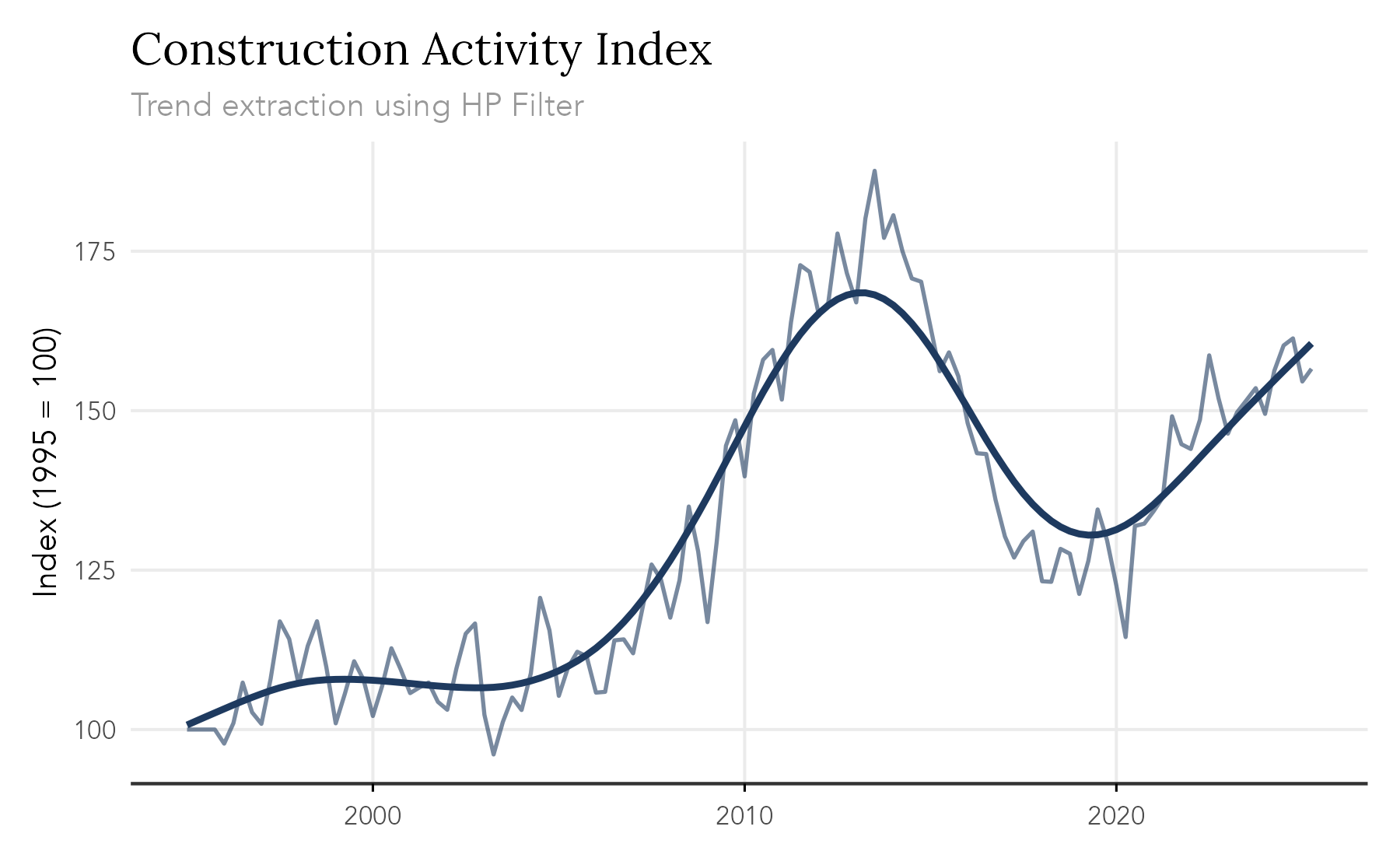
An equivalent extract_trends() function is also available for ts objects.
stl_trend <- extract_trends(AirPassengers, methods = "stl")
#> Computing STL trend with s.window = periodic
plot.ts(AirPassengers)
lines(stl_trend, col = "#C53030")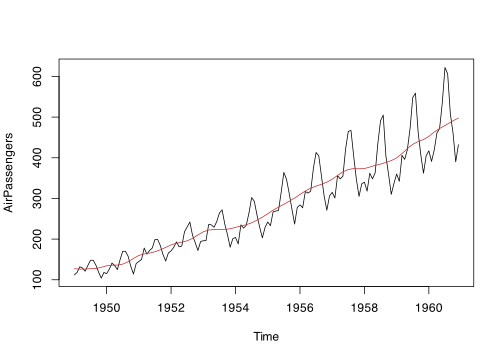
Available Methods
The Trend Extraction Methods vignette describes each one — when to use it and which parameters it takes.
| Method | Description |
|---|---|
hp |
Hodrick-Prescott filter |
hamilton |
Hamilton regression filter |
bn |
Beveridge-Nelson decomposition |
ucm |
Unobserved components model |
bk |
Baxter-King bandpass filter |
cf |
Christiano-Fitzgerald bandpass filter |
ma |
Simple moving average |
wma |
Weighted moving average |
ewma |
Exponentially weighted moving average |
triangular |
Triangular moving average |
median |
Median filter |
gaussian |
Gaussian-weighted moving average |
spencer |
Spencer’s 15-term moving average |
henderson |
Henderson moving average |
stl |
Seasonal-trend decomposition via Loess |
loess |
Local polynomial regression |
spline |
Smoothing splines |
poly |
Polynomial trends |
kernel |
Kernel smoother |
kalman |
Kalman filter/smoother |
Learn More
To learn more about the package be sure to visit the webiste
The vignettes below cover each function in detail.